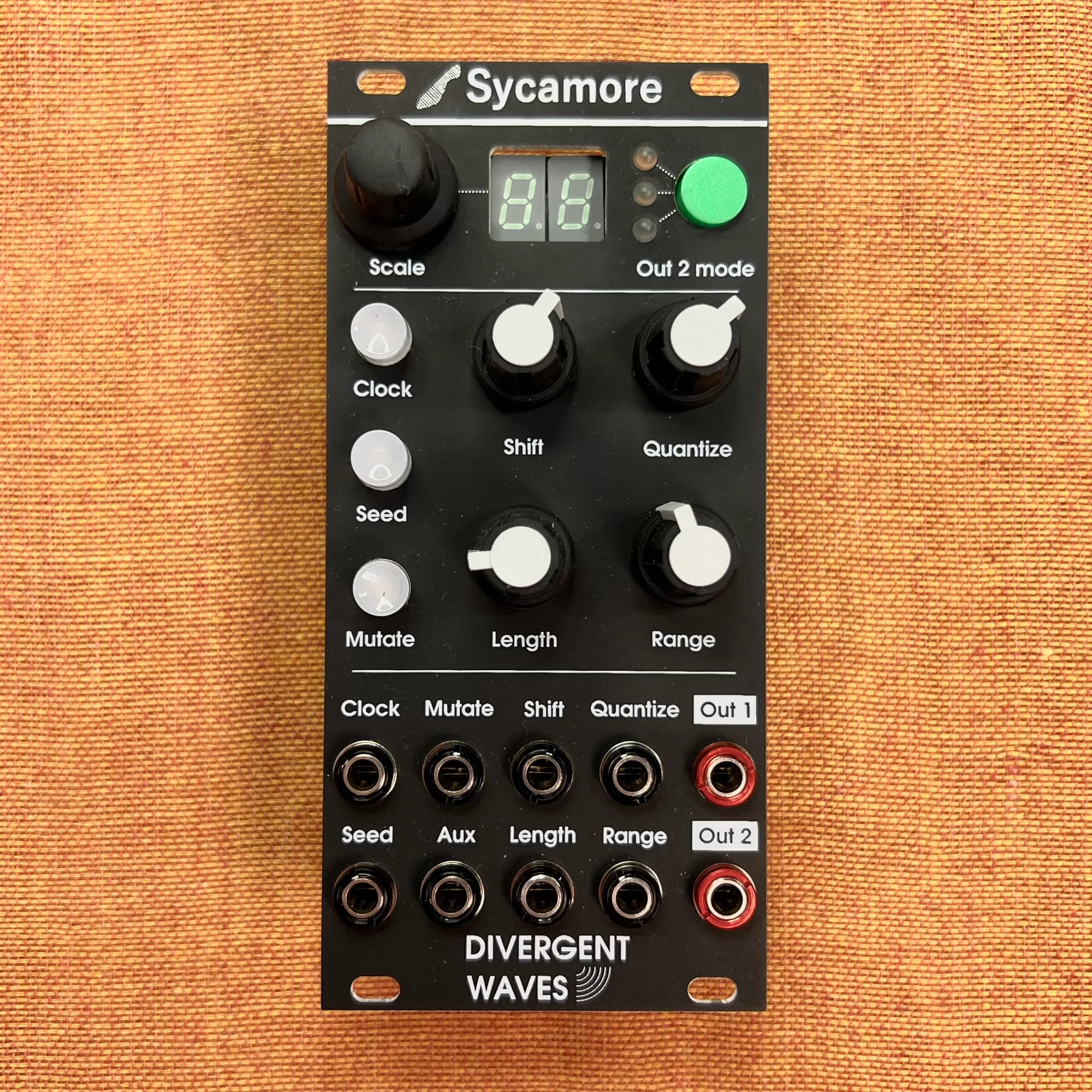
This is an introduction and overview of the Sycamore modular synthesizer module by Divergent Waves, available at Takazudo Modular.
Sycamore is a random loop sequencer. It internally generates random number arrays of arbitrary length and ultimately outputs scale-quantized 1V/Oct CV from two outputs. It offers diverse control via CV and gate triggers, and is a significantly expanded design by Divergent Waves based on the ideas from Mutable Instruments’ cancelled project Seeds (2015).
This Sycamore was purchased as a DIY kit directly from Divergent Waves and assembled by Takazudo.
This product is available for purchase below.
- What Is a Random Loop Sequencer
- Sycamore Basic Feature Overview
- Sycamore’s Usability
- Other Input/Output Jacks
- Scale Tweak Mode
- Second 1V/Oct Output
- Summary and Manual
- Reference Videos
- Specifications
- Included Items
What Is a Random Loop Sequencer
The term “random loop sequencer” isn’t commonly used in general parlance, but if you had to describe this module’s function in one phrase, that’s what it would be. An existing similar module would be Music Things Modular’s Turing Machine.
The Turing Machine is an interesting module built around a core function of creating random CV sequences and looping them, with various expanders enabling diverse uses. Sycamore similarly works with random repeating data, but its output is scale-quantized 1V/Oct CV. It places greater focus on the approaches available for controlling the output 1V/Oct CV using knobs and CV.
Beyond simply looping CV, Sycamore allows you to define your own scales, limit which notes within a scale are used, and control the range of the generated 1V/Oct output. It’s a module where random CV generation and a quantizer are fused into one.
Sycamore Basic Feature Overview
To help you quickly understand Sycamore’s features, let’s assume the knobs are set as follows:

Pay particular attention to the four knobs highlighted in red, which are central to operating the Sycamore.
Scaleencoder set to1(C major scale)Shiftknob fully counterclockwise (no CV offset)Quantizeknob fully clockwise (all scale notes C D E F G A B active)Lengthknob fully clockwise (64-step sequence generated)Rangeknob fully clockwise (5-octave pitch range)
Then, send continuous gate signals to the Clock jack. Connect the signal from the Out1 jack to a VCO’s 1V/Oct jack.
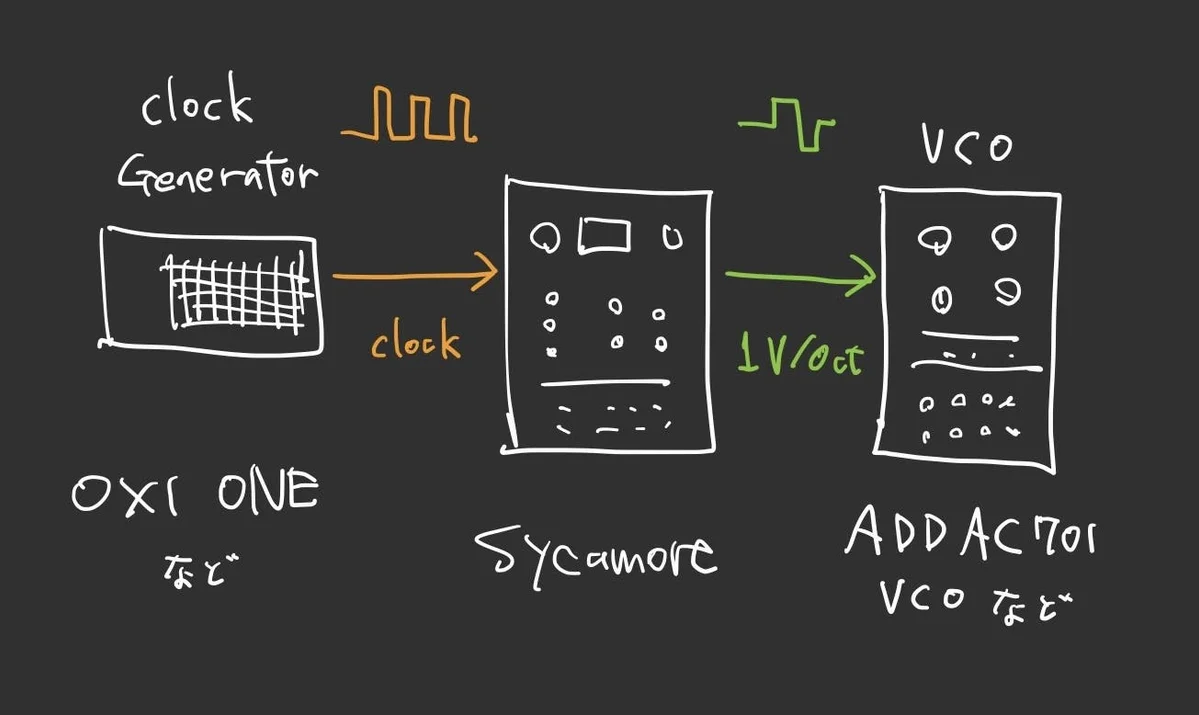
What happens is that each time a clock is received, Sycamore randomly selects one note from the C major scale within a 5-octave range and sends that 1V/Oct CV to the VCO.
In this state, with Length set to maximum, the internal sequence has 64 steps. When the 65th clock is received, the sequence played up to step 64 restarts from the beginning.
This sequence changes as follows when you adjust the available knobs and buttons:
Scale Encoder: Scale Selection
Turning the Scale encoder changes the number displayed on the LED. This number represents which scale to quantize the generated 1V/Oct to. In the example above, 1 quantizes to the C major scale. Turning the encoder switches to other scales, for example:
2: C minor scale3: C Mixolydian10: C Dorian16: C harmonic minor
The scale list is stored as text files on the internal Raspberry Pi Pico, and Sycamore comes preloaded with 50 scale presets. The full list of which number corresponds to which scale can be found here (as of firmware v1.0):
The Raspberry Pi Pico can be accessed by connecting the port on the back of the module to a PC/Mac via USB cable, allowing users to freely edit the scale text files and create custom scales.
Shift Knob: Offset
The Shift knob shifts the pitch of the generated 1V/Oct up or down. In the example above, with Shift fully counterclockwise, the pitch is at its lowest. Turning clockwise raises the pitch.
Quantize Knob: Scale Note Filter
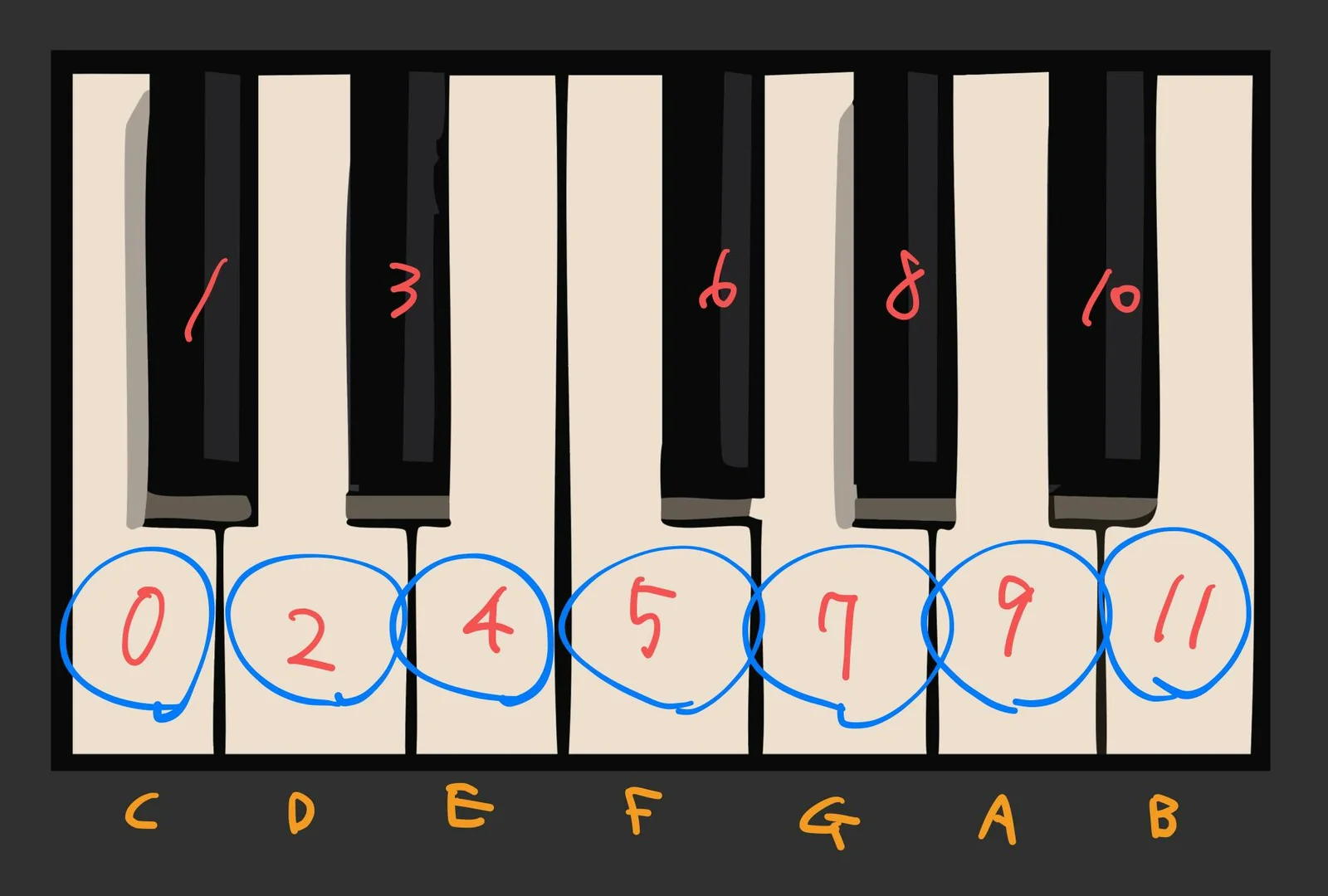
The Quantize knob filters which notes within the scale are used. In the example above, this knob was set fully clockwise, meaning all C major scale notes C D E F G A B are used.
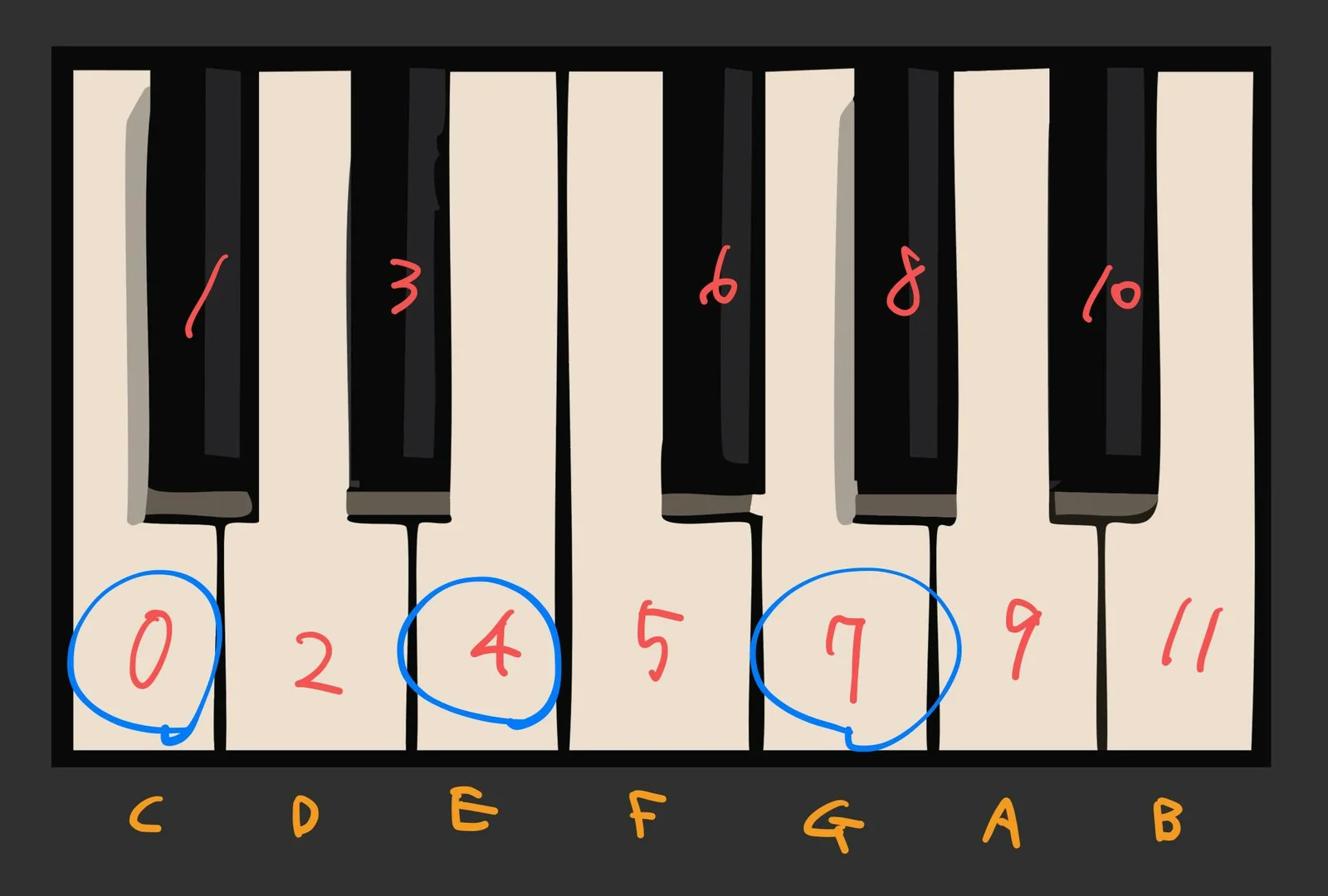
Setting this knob to around center limits the available notes to the C E G major chord tones, and at the minimum (fully counterclockwise), only C is used.
In other words, the following shows when Quantize is at maximum. The notes highlighted in blue are the active ones.
And the following shows when Quantize is around center.
Why does this happen?
The notes filtered by this knob respect the order written in the scale text file mentioned earlier. For scale 1 (C major), the text file contains:
{
"notes": [0, 4, 7, 9, 2, 5, 11],
"index": 1
}
The numbers in notes represent each note, corresponding to the numbers shown on the keyboard diagram. Following them in sequence fills in all the white keys, so turning the Quantize knob fully clockwise uses all C major scale notes.
Notice that notes starts with 0, 4, 7. These are C, E, G. When turning the Quantize knob counterclockwise from maximum, notes corresponding to numbers in notes are excluded from the end. So at about halfway, the first 3 or 4 numbers remain, resulting in C E G tones.
In this way, Sycamore’s built-in scale presets represent notes from various scales in a carefully considered order. When you narrow down notes with the Quantize knob, for example with C major’s scale 1, C E G remains, producing a major chord tonality.
Length Knob: Sequence Length
The Length knob sets the length of the generated sequence. It ranges from a minimum of 1 to a maximum of 64 steps. In the example above, set fully clockwise, a 64-step sequence was generated. Turning counterclockwise gradually shortens the sequence—center gives 32 steps, and fully counterclockwise gives 1 step.
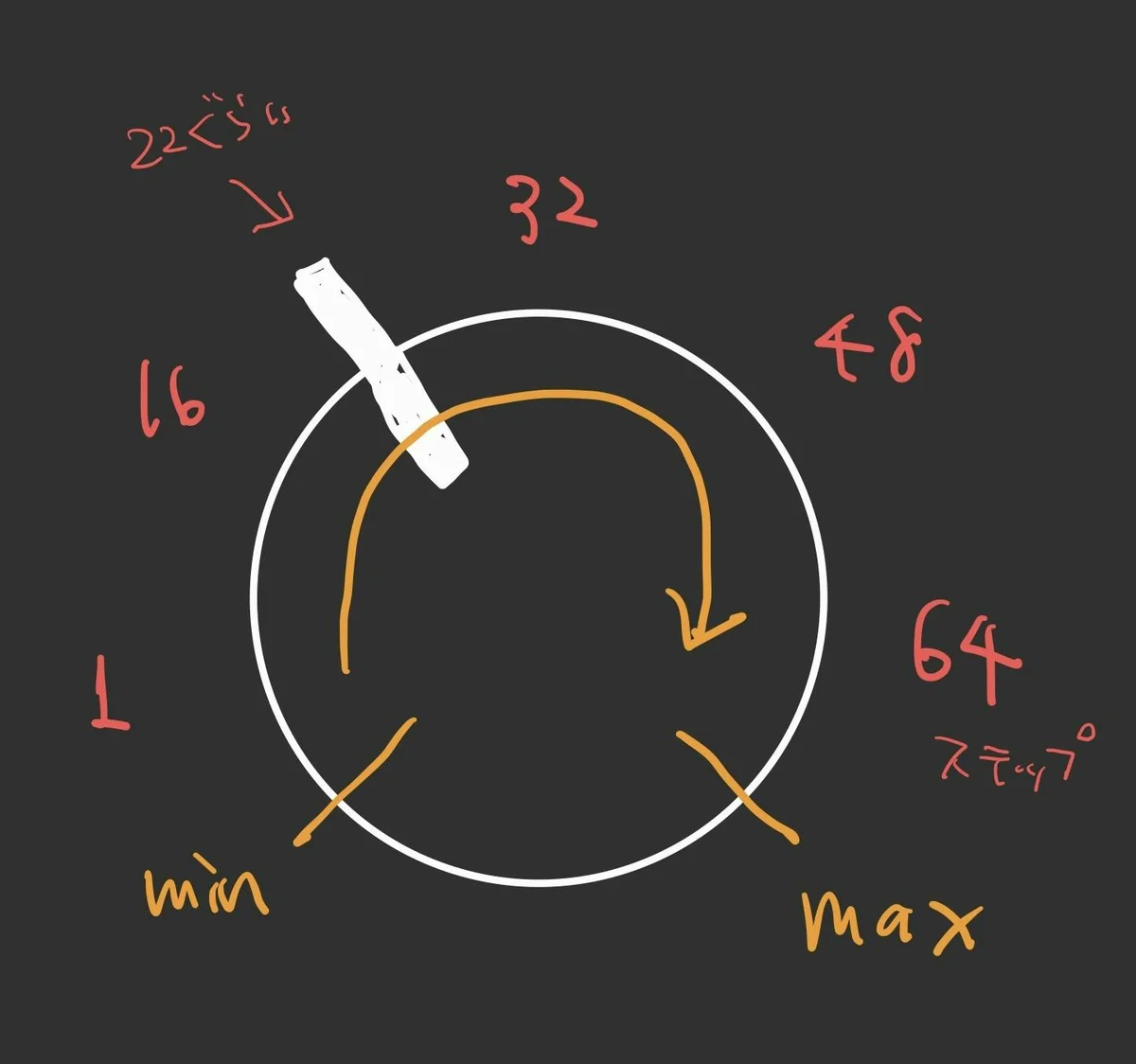
Range Knob: Pitch Range
The Range knob sets the range of generated pitches. Maximum is 5 octaves. In the example above, set fully clockwise, pitches were selected from a very wide 5-octave range. Turning counterclockwise narrows the range gradually—around center gives approximately 2.5 octaves, and fully counterclockwise produces mostly a single low C.
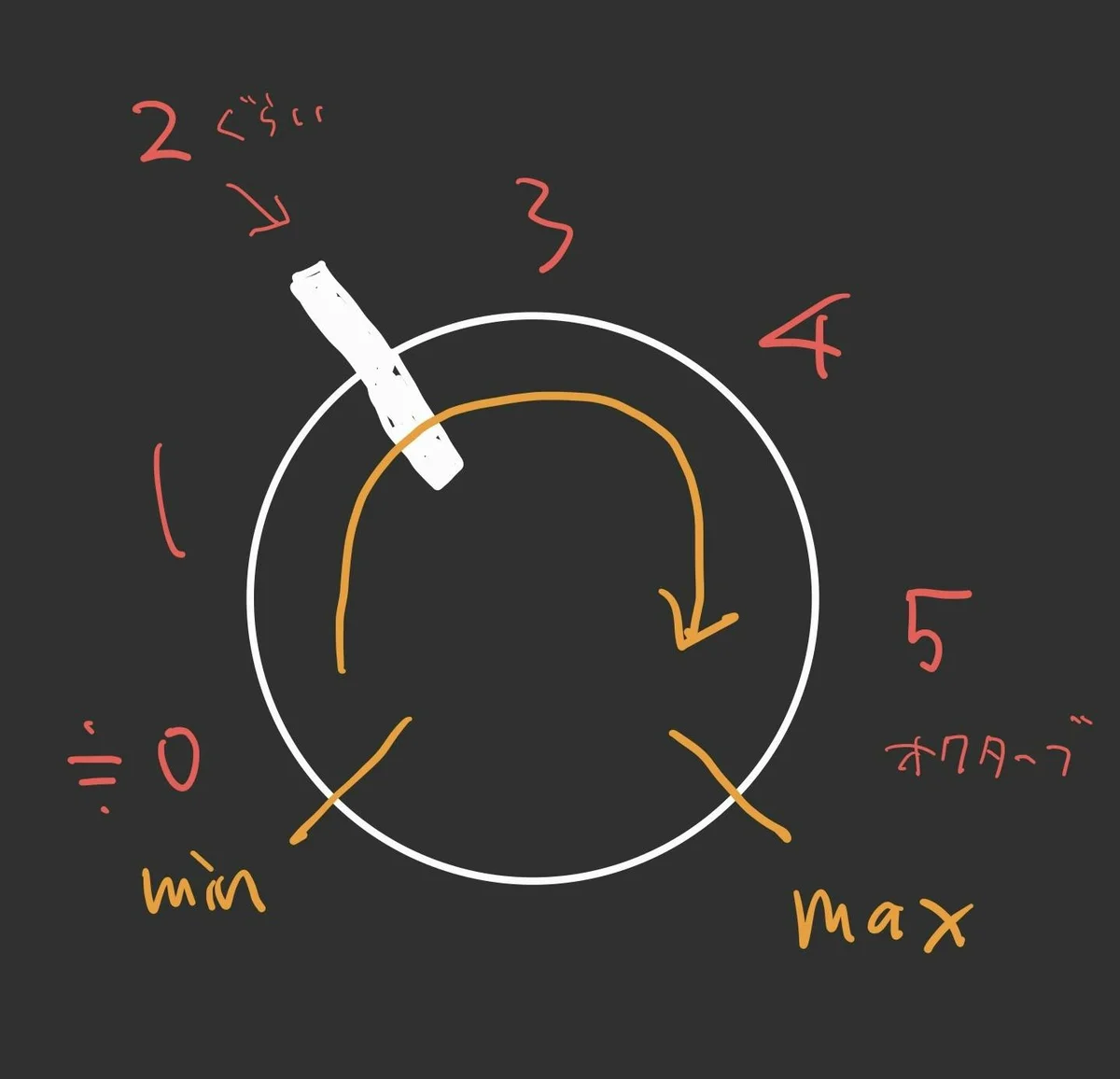
Clock Button: Manual Clock Trigger
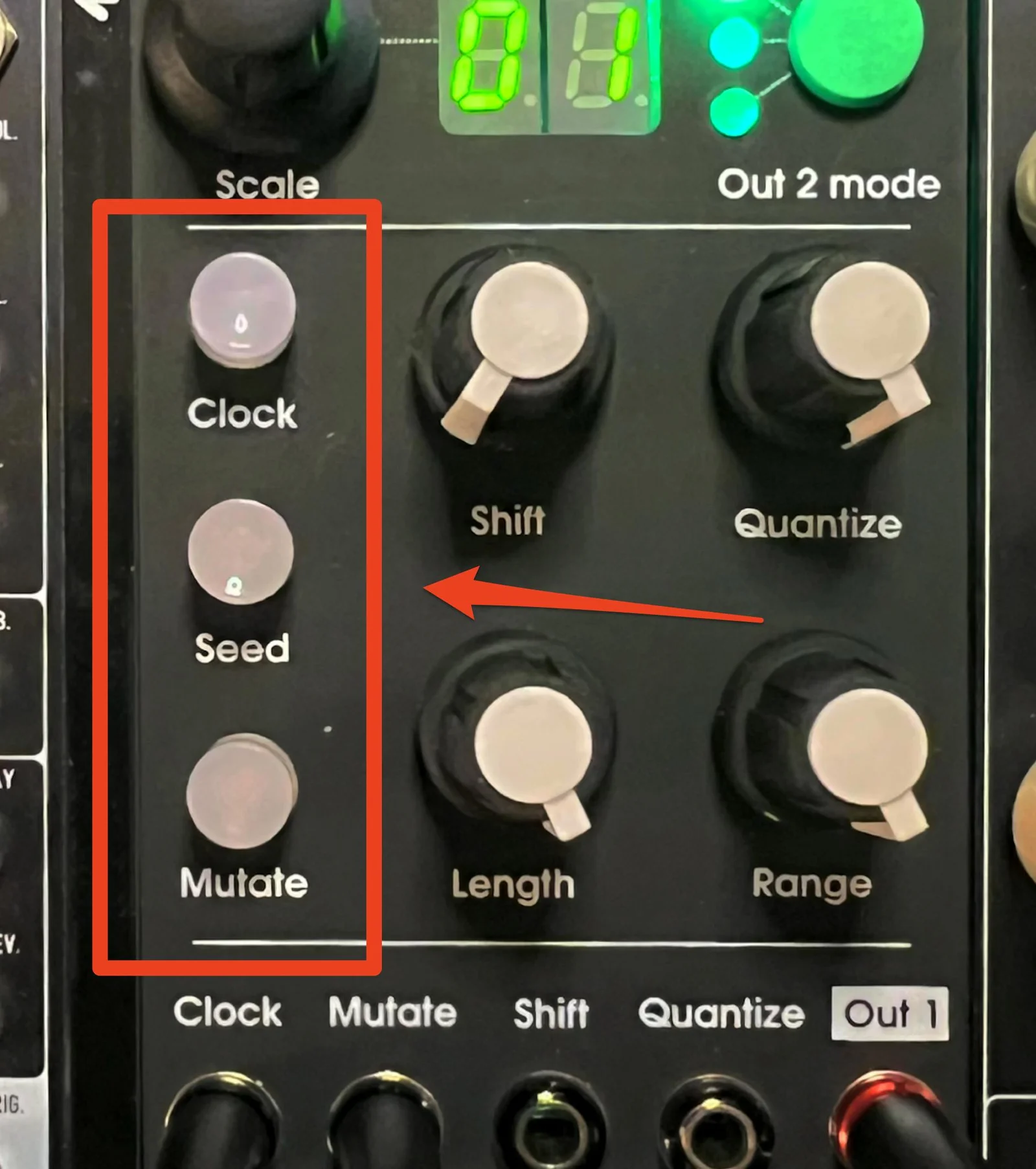
While the primary use is receiving gates at the Clock jack to advance the sequence, pressing the Clock button manually advances the sequence by one step.
Seed Button: Sequence Randomization
Pressing the Seed button discards the current sequence and generates an entirely new sequence. Use this when you want to start fresh.
Mutate Button: Change Next Step Only
The Mutate button changes only the pitch of the next step in the sequence. Unlike Seed, which completely replaces the sequence, Mutate only changes the next step’s pitch. This is useful for making partial changes without drastically altering the current sequence.
The pitch of the step changed by Mutate is influenced by the CV level (0V to +5V) at the Aux jack. With nothing connected to Aux, it’s treated as 0V, so to effectively use Mutate, you need to send a fixed voltage or CV output from a sequencer to Aux.
That covers the basic features of Sycamore.
Sycamore’s Usability
I’ll continue the explanation, but first let me share my impressions as a summary of the basics.
The basic workflow with Sycamore is to memorize your favorite scale numbers, select them with the Scale encoder, then adjust various knobs while sending gate to Clock, and use the Seed and Mutate buttons to shape the sequence into melodies you like.
Personally, what makes Sycamore feel easy to use is that internally, the module has clearly separated:
- Random number generation
- Quantization processing
And the output 1V/Oct only updates when the sequence step advances upon receiving a clock. Since casually turning knobs won’t suddenly change the currently output 1V/Oct, the module feels like three things in one:
- Random CV sequence creation module
- Sample & Hold
- Quantizer
The random generation aspect is also quite well-designed. When creating random 1V/Oct yourself, you could use white noise as a source for random melodies. Sample-and-holding white noise through a quantizer per clock gives you a random melody that changes each clock. However, this results in constantly changing randomness that can feel too random! (In my subjective opinion.)
With Sycamore, you can control pitch range, note filtering, and sequence length, plus regenerate with Seed and partially update with Mutate, making it appealing to manage randomness at a sweet spot.
This control can be as simple as pressing Seed when you want change, but by sequencing the gate sent to Mutate and the CV sent to Aux externally, you achieve a balance of being random yet controllably responsive. (More on this later.)
So there’s a sense that you can sustain an ongoing performance with reasonable regularity just by continuously managing the CV and gates around this module. That’s what makes it such an interesting module, in my opinion.
Other Input/Output Jacks
From here, I’ll cover points not yet discussed, including some more advanced topics.
First, the input/output jacks at the bottom of the module.
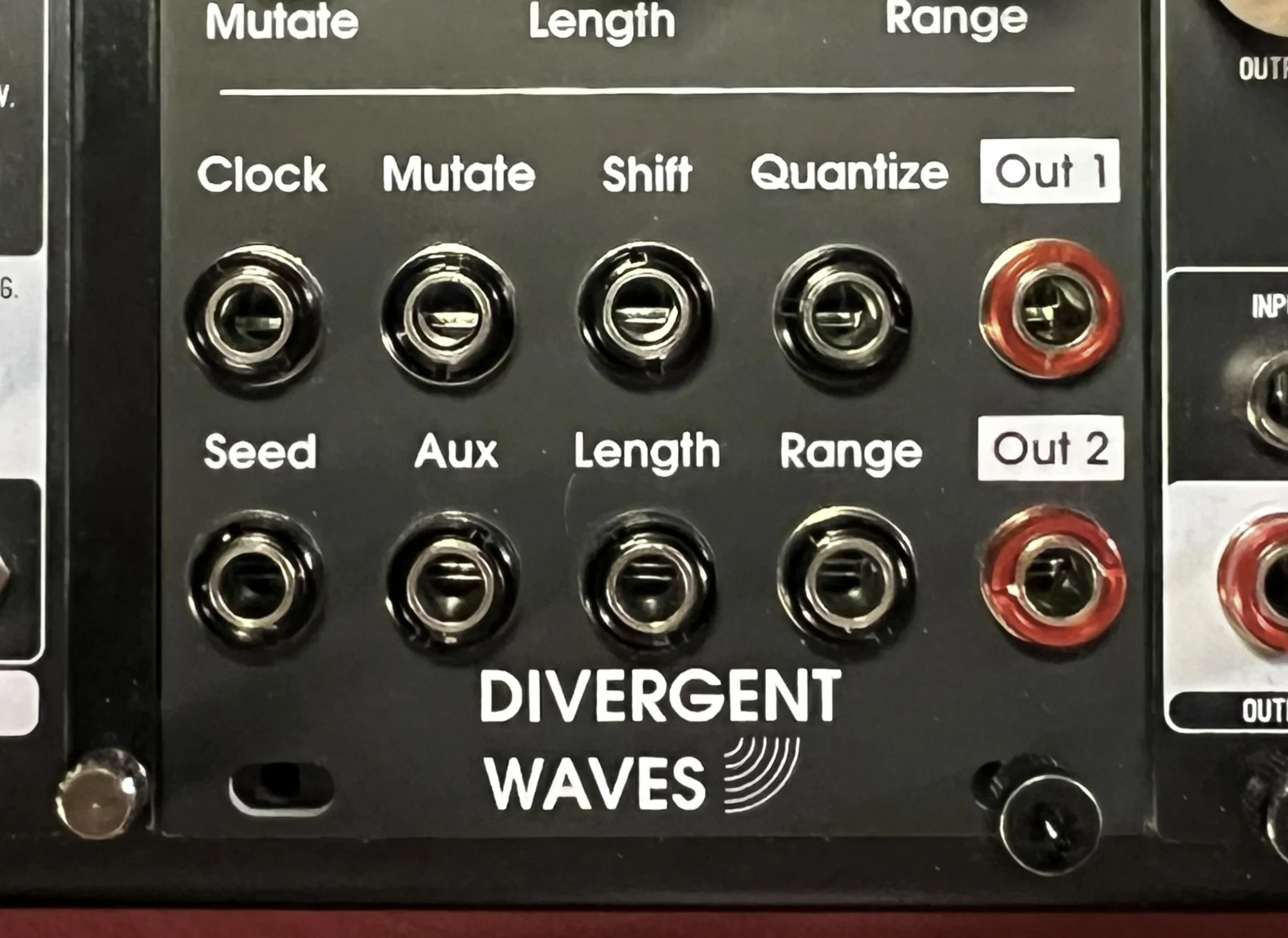
Some were already mentioned, but here’s each one explained:
Clock: Gate signal input. Advances the sequence by one step. (Same function asClockbutton)Seed: Gate signal input. Regenerates the sequence. (Same function asSeedbutton)Mutate: Gate signal input. Changes only the next step’s pitch. (Same function asMutatebutton)Aux: Used with theMutatebutton/CV input. Accepts 0V to +5V CV.Shift: -5V to +5V CV input. Offset for theShiftknob value.Length: -5V to +5V CV input. Offset for theLengthknob value.Quantize: -5V to +5V CV input. Offset for theQuantizeknob value.Range: -5V to +5V CV input. Offset for theRangeknob value.Out 1: Outputs the main 1V/Oct CV.Out 2: Outputs sub-sequence 1V/Oct CV.
Out 2 is new here and will be explained later.
Scale Tweak Mode
The Scale encoder can be pressed to enter Scale Tweak Mode. When in tweak mode, a dot appears on the numeric LED to indicate you’re in adjustment mode.
In Scale Tweak Mode, pressing the Scale encoder briefly shuffles the order of notes within the scale. What this does is randomly rearrange the order of notes in the text file preset discussed earlier.
{
"notes": [0, 4, 7, 9, 2, 5, 11],
"index": 1
}
This means that if the Quantize knob was set around center and notes were being selected from C E G, they might change to E A B, or D G A—notes are swapped within the same scale. Long-pressing the Scale encoder exits tweak mode and returns the scale notes to their initial order.
Because this shuffle only rearranges the notes while the internal random number array of the sequence remains unchanged, it produces a result where the feel of the current sequence largely persists but the notes are swapped. The ability to long-press to revert is also convenient.
Second 1V/Oct Output
So far, the discussion has focused on the 1V/Oct CV from Out1, but Sycamore also outputs a secondary 1V/Oct CV from the Out2 jack. Potential uses include driving another VCO, feeding 1V/Oct to resonators or filters that accept pitch CV, or routing to pitch-shift effects.
The 1V/Oct CV from Out2 can be selected from three modes:
- Harmony Mode:
Out1’s 1V/Oct shifted by a specified number of semitones (up to 24) - Delay Mode:
Out1’s 1V/Oct delayed by a specified number of clock steps (default is 4 steps) - Independent Mode: Outputs an independent sequence unrelated to
Out1but sharing the same scale
The Out2 mode is cycled by pressing the green Out2 mode button, and the current mode is indicated by the LED next to the Out2 mode button.
Long-pressing the Out2 mode button enters Out2 adjustment mode, where you can adjust the semitone count for Harmony Mode or the clock count for Delay Mode using the Scale encoder. Long-press Out2 mode again to exit.
Summary and Manual
That covers most of Sycamore’s features. Beyond just creating random 1V/Oct sequences, having a secondary 1V/Oct output means that just by sending gate clocks to this module, you can create quite complex melodies—in two independent channels.
Simply switching the Out2 mode back and forth or adjusting the knobs can produce reasonably well-structured melodies. As with any customizable quantizer (e.g., ADDAC207 Intuitive Quantizer), even without music theory knowledge, you can sense the tonal differences between scales through modules like this, and explore what approaches are possible by sequencing CV and gates externally. In my view, this is one of the most fascinating aspects of modular synths, and it deeply reinforces the feeling that modular synths are instruments.
That concludes the Sycamore explanation. However, some details were simplified. Specifically, the random number generation process is more precisely defined and understandable. Understanding it makes the module more intuitive to operate, so I recommend reading the original manual:
Reference Videos
Below is the official Divergent Waves Sycamore introduction video. It’s helpful for understanding each knob and button’s function.
The following two videos show me using Sycamore to play two ADDAC701.REV2 VCOs. In both videos, OXI ONE is sequencing only the gates sent to Sycamore and the Envelope Generator triggering the DPLPG. Note that OXI ONE generates no 1V/Oct at all—the melodies come entirely from Sycamore’s 1V/Oct output.
Specifications
- Width: 12HP
- Depth: 30mm
- Power consumption: 60mA +12V / 10mA -12V / 0mA 5V
Included Items
- Power ribbon cable
- Screws
Divergent Wavesについて
Divergent Wavesはアメリカカンザス州に拠点を置くMike Williamsさんが一人で運営するモジュラーシンセメーカーです。
Divergent Wavesのモジュールは、一見ベーシックに見えるけれど、細部まで考え抜かれ、とことん作り込まれたモジュールばかりです。
オマケ: 電氣美術研究會モジュラー小物セット付き

モジュラーシンセをもっと多くの方に触って欲しいという願いの元、電氣美術研究會さまにご協力頂き、モジュラー小物セットを本商品にバンドルさせて販売させていただいております。
パッチケーブルや電源ケーブル、ドレスナットのサンプルセット、モノラルスプリッターなど、内容は時期に応じて変化します。商品に同梱しますので是非お試し下さい!
That concludes our introduction of the Divergent Waves Sycamore.
We hope you find this helpful.