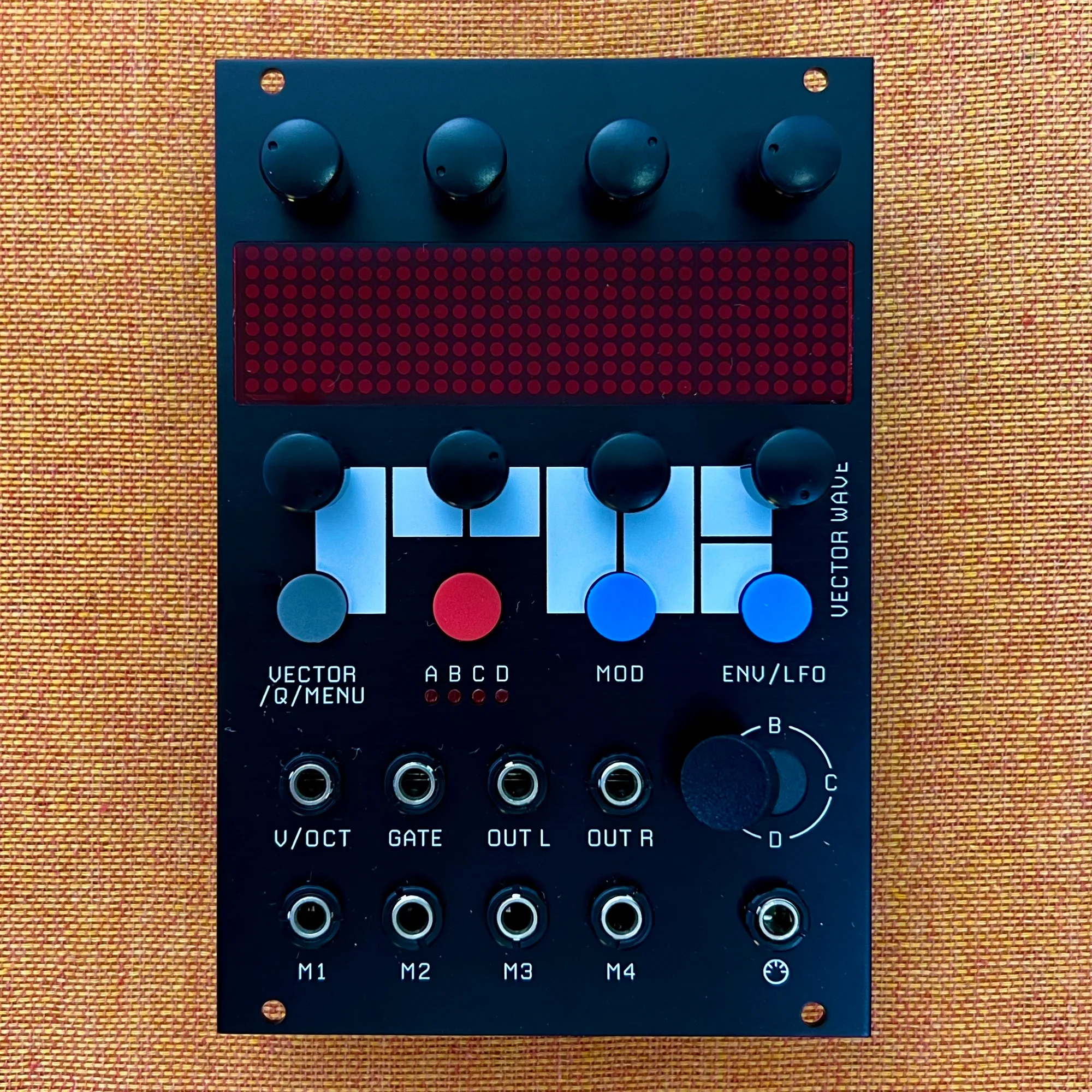
This is an introduction and overview of the Vector Wave by RYK Modular, available at Takazudo Modular. Vector Wave is an oscillator module built on FM Synthesis and Vector Synthesis, packed with Envelope, LFO, VCA, diverse modulation, wave folding and more, all driven by 16 oscillators—a richly featured digital oscillator module.
This product was built by Takazudo Modular in collaboration with a domestic builder using the DIY kit. After assembly, all functions were tested and verified before listing. This module is sold with permission from its manufacturer, RYK Modular.
This product also has a separately sold expander, Vector Wave Expander, which is also available at Takazudo Modular. We’ll cover both here.
This product is available for purchase below.
- What Kind of Module Is Vector Wave
- 4 Oscillators x 4 Banks
- Vector Synthesis
- FM Synthesis +
- Flexible Routing with 6 Slots
- MIDI Control
- When to Use Vector Wave
- Reference Videos
- Other Notes
- Specifications
- Included Items
- Manual
- Vector Wave Expander Connection Guide
What Kind of Module Is Vector Wave
This module is a digital oscillator, but understanding what it does is somewhat challenging because it’s a mega-loaded module packed with many different elements.
First, it has a built-in ADSR Envelope that controls volume in response to gate input, so no external VCA and Envelope are needed. It also features AM modulation, FM modulation, Wave Folding, Waveform Warp (morphing from sine to saw to pulse), and many other timbral variation features.
Furthermore, it includes built-in LFOs and Envelopes beyond the volume envelope, which can be routed to various parameters. And the four CV input jacks (M1 through M4) can have their CV/gate inputs routed to most parameters as well. Combined with a sequencer, this module alone can accomplish quite a lot.
At the core of this module are 16 oscillators. While it has 16 oscillators, internally they’re organized as four oscillators per group, with four such groups. Being able to combine these in diverse ways is what this module is all about.
4 Oscillators x 4 Banks
Let’s start with the overall picture. Below is a rough diagram of Vector Wave’s architecture.

The top of the diagram shows four banks (A, B, C, D), each containing four oscillators internally. Moving right, they merge into one signal path through VECTOR MIX to OUT.
Having four banks of four oscillators each is the first key concept for understanding this module.
Vector Synthesis
The VECTOR MIX section adjusts the blend of the four banks. How do you control this blend? Primarily by moving the Joystick below.


The letters A, B, C, D are written around the joystick, representing each bank. The joystick can be rotated to operate, and moving it with your finger determines its position (evaluated internally as X and Y coordinates). The output from each bank is mixed according to the direction (vector) indicated by the joystick, and the result is output from OUT.
This method of synthesizing waveforms based on vector (direction) information obtained through a joystick-like interface is called Vector Synthesis. It was implemented in synthesizers like the Korg Wavestation and Yamaha’s SY series, which were popular in the 1990s.
Vector Synthesis—the ability to create tones by switching between four bank ratios—forms the core synthesis method of this module.
FM Synthesis +
Next, regarding the four oscillators that compose each bank: this section employs FM Synthesis. FM Synthesis creates diverse tones by modulating oscillators against each other. The most famous synthesizer incorporating FM Synthesis is the Yamaha DX7.
When changing the oscillator configuration within a bank, Vector Wave’s display shows four squares representing the four oscillators.

The knobs directly below the display correspond to each oscillator, and pressing them changes the lines connecting the squares, modifying the modulation relationships between oscillators.
Below are display examples and diagrams showing the modulation flow between oscillators for each configuration.
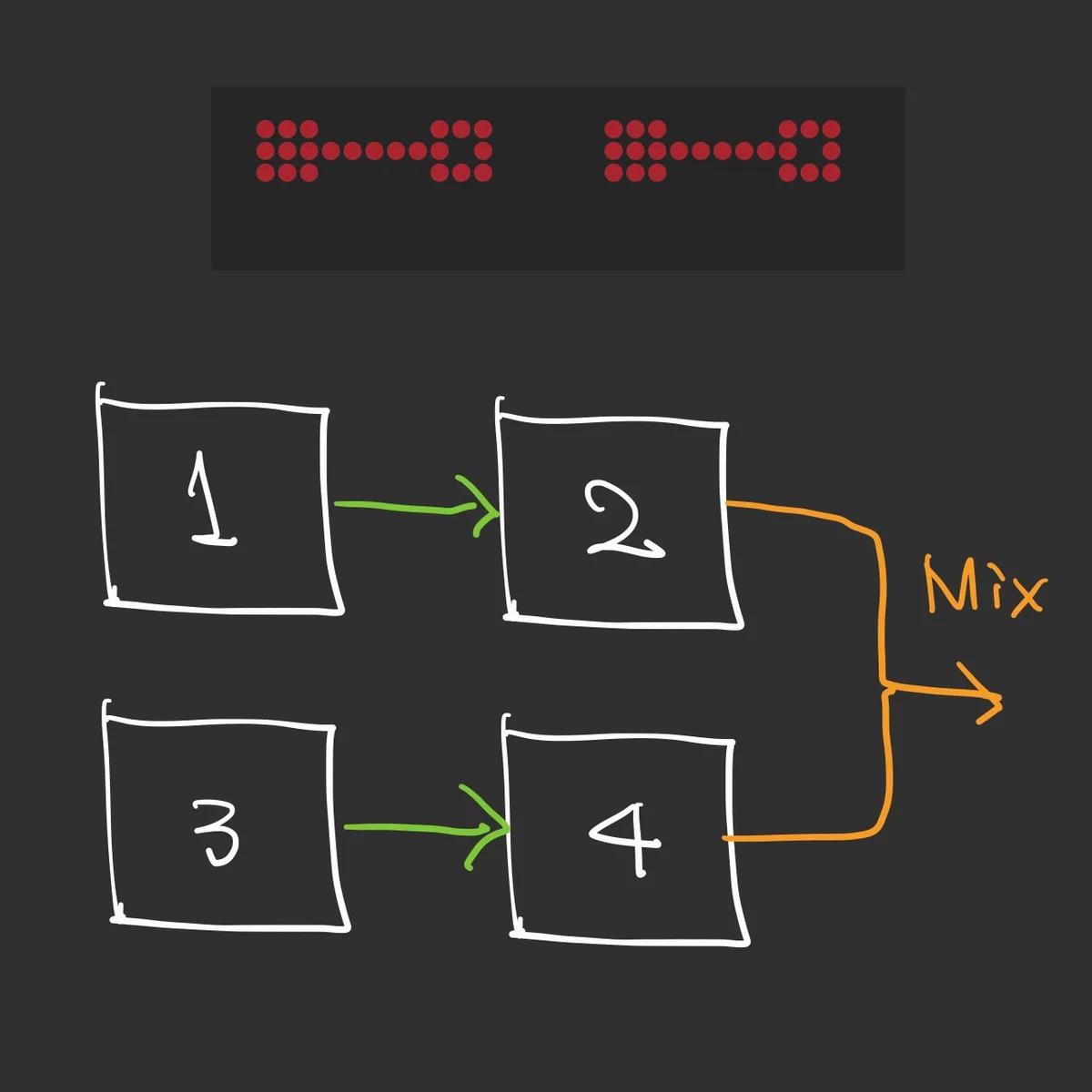
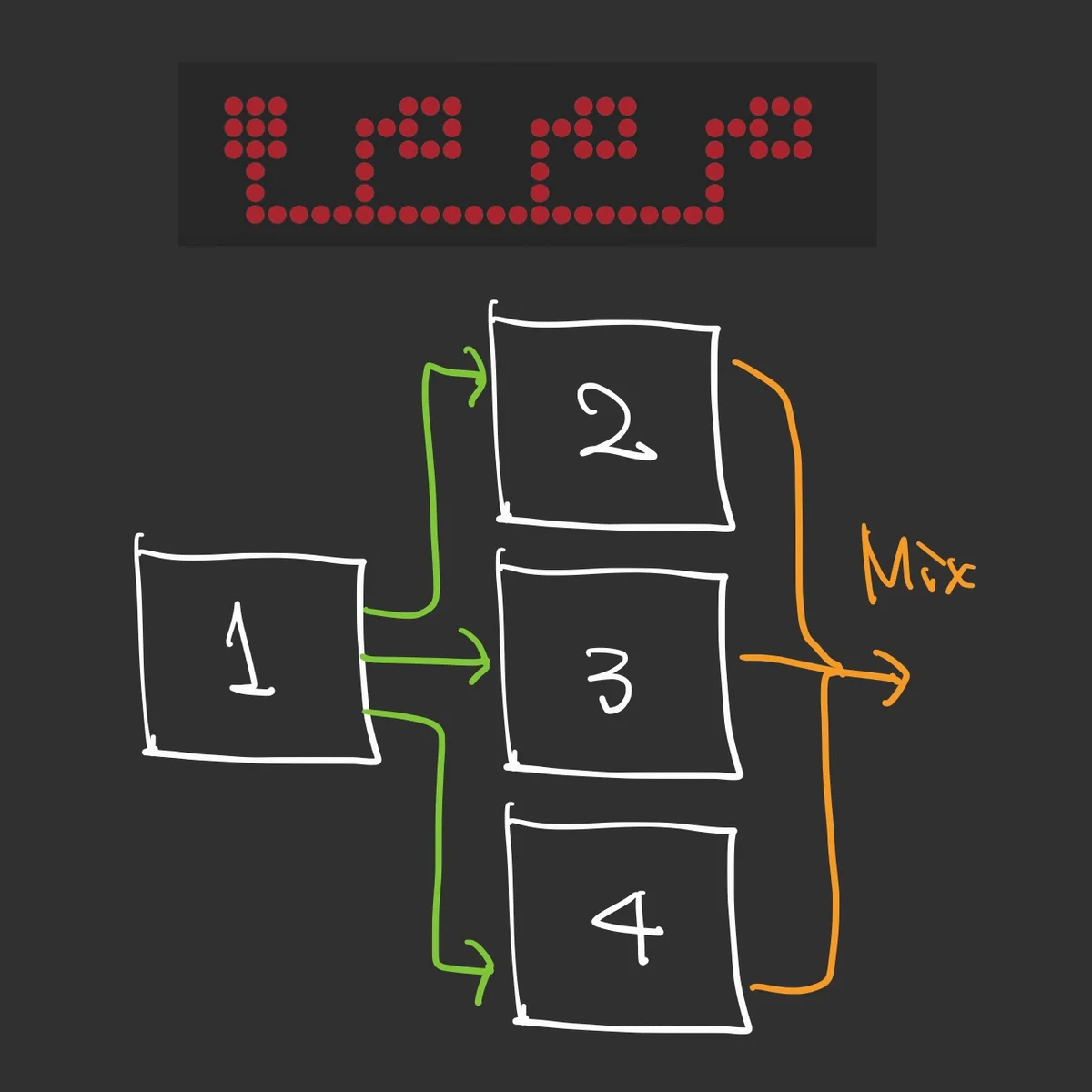
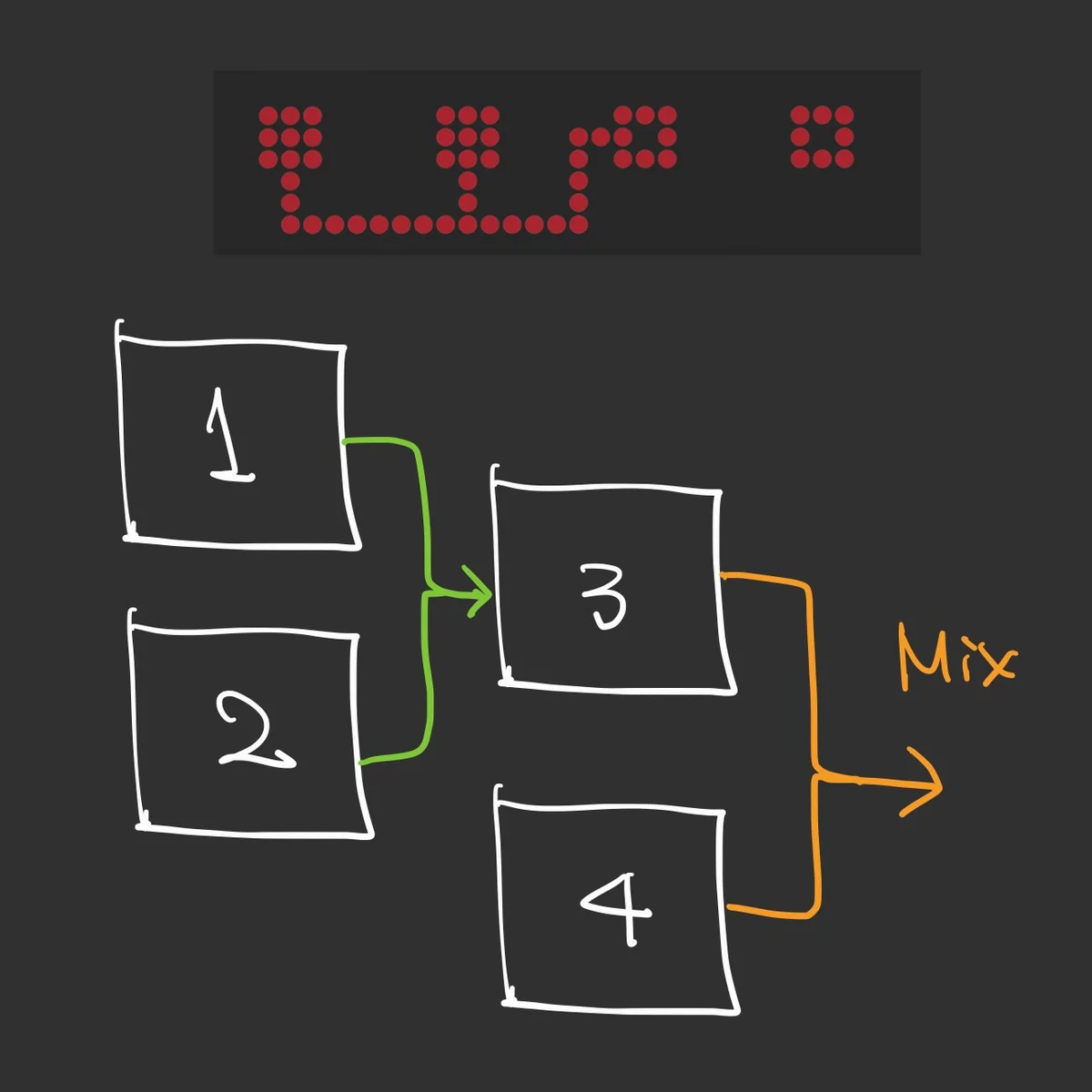
Each oscillator can individually adjust Frequency, Fine Tuning, and Level, and the cross-modulation amount (XM) between oscillators can be easily controlled.
You can also eliminate all inter-oscillator modulation relationships to use it as a 4-voice polyphonic oscillator, or specify chord relationships for the four oscillators’ pitches.
In essence, rich timbres beyond just FM Synthesis can be created within a single bank.
Flexible Routing with 6 Slots
With this rich synthesis core of 16 oscillators across 4 FM synthesis banks, you’ll naturally want to control various parameters via external CV in a modular synth context. Four jacks for this purpose—M1, M2, M3, M4—are provided at the bottom of the panel.
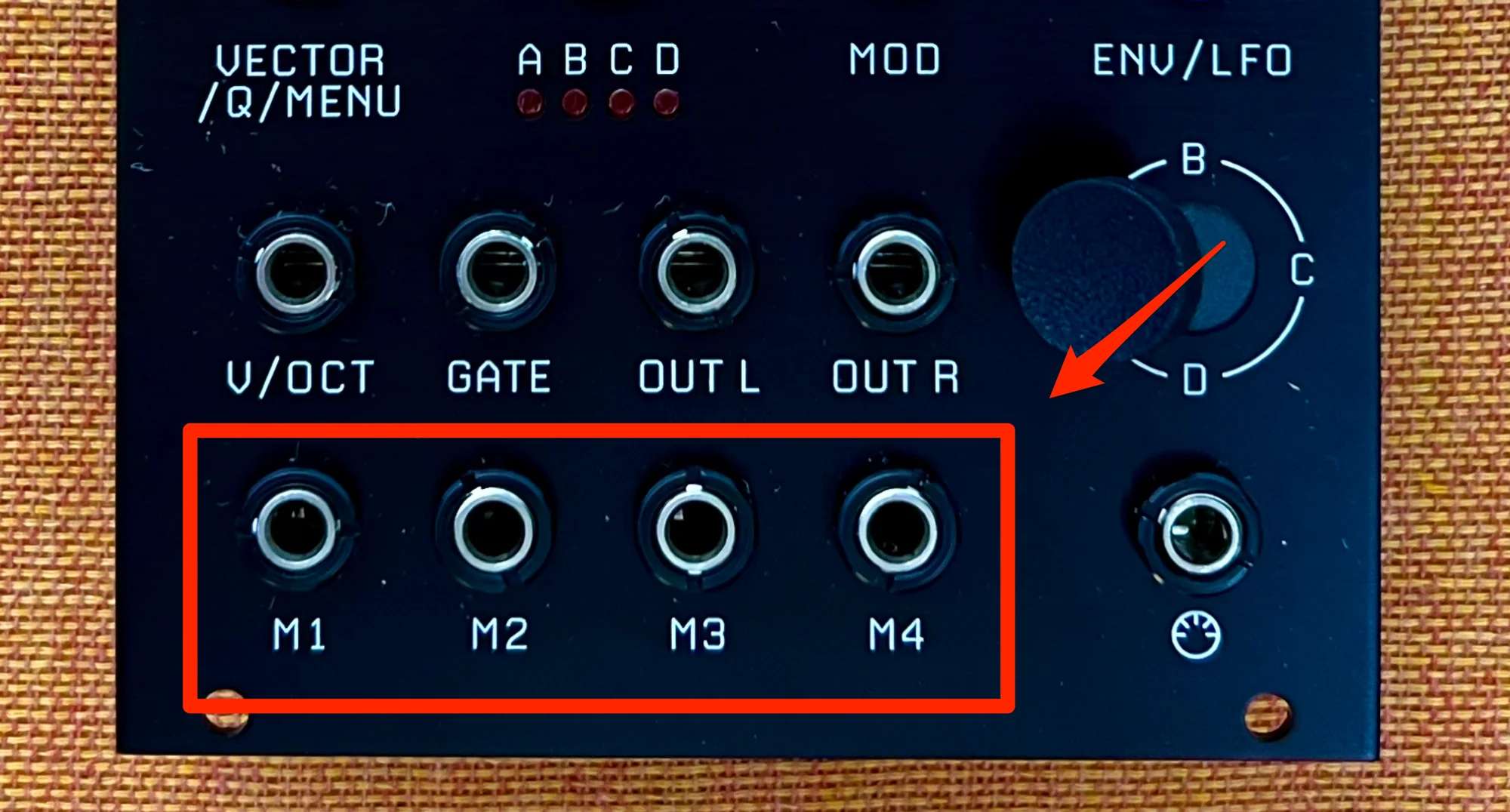
With so many adjustable parameters, you might think four jacks wouldn’t be enough. But the routing system is actually quite flexible, thanks to the Slot concept. Vector Wave has 6 Slots.
Each Slot can be configured with a modulation source and modulation destination. Sources can include CV from the M1–M4 jacks, built-in LFO, Envelope, joystick position, and more. Destinations can include the ADSR envelope parameters, filter amount, Wave Folder amount, and most other parameters.
The feel is like being able to route CV inputs and LFOs freely to whatever parameters you want to control, essentially building your desired synthesizer within this module.
MIDI Control
Vector Wave has 1V/Oct and gate input jacks. While each bank has a 4-oscillator configuration, the limited number of input jacks means you can only control pitch with one 1V/Oct signal. MIDI enables more flexible control.
Setting Vector Wave to MULT (multi-timbral) mode switches to a mode where four oscillators are controlled independently. By default, Ch1 Note On controls the first oscillator, Ch2 Note On controls the second, and so on—each channel controls a different oscillator. In any mode, Slot modulation sources can also be assigned to any MIDI CC.
MIDI input is received via TRS cable through the MIDI jack at the bottom of the panel.
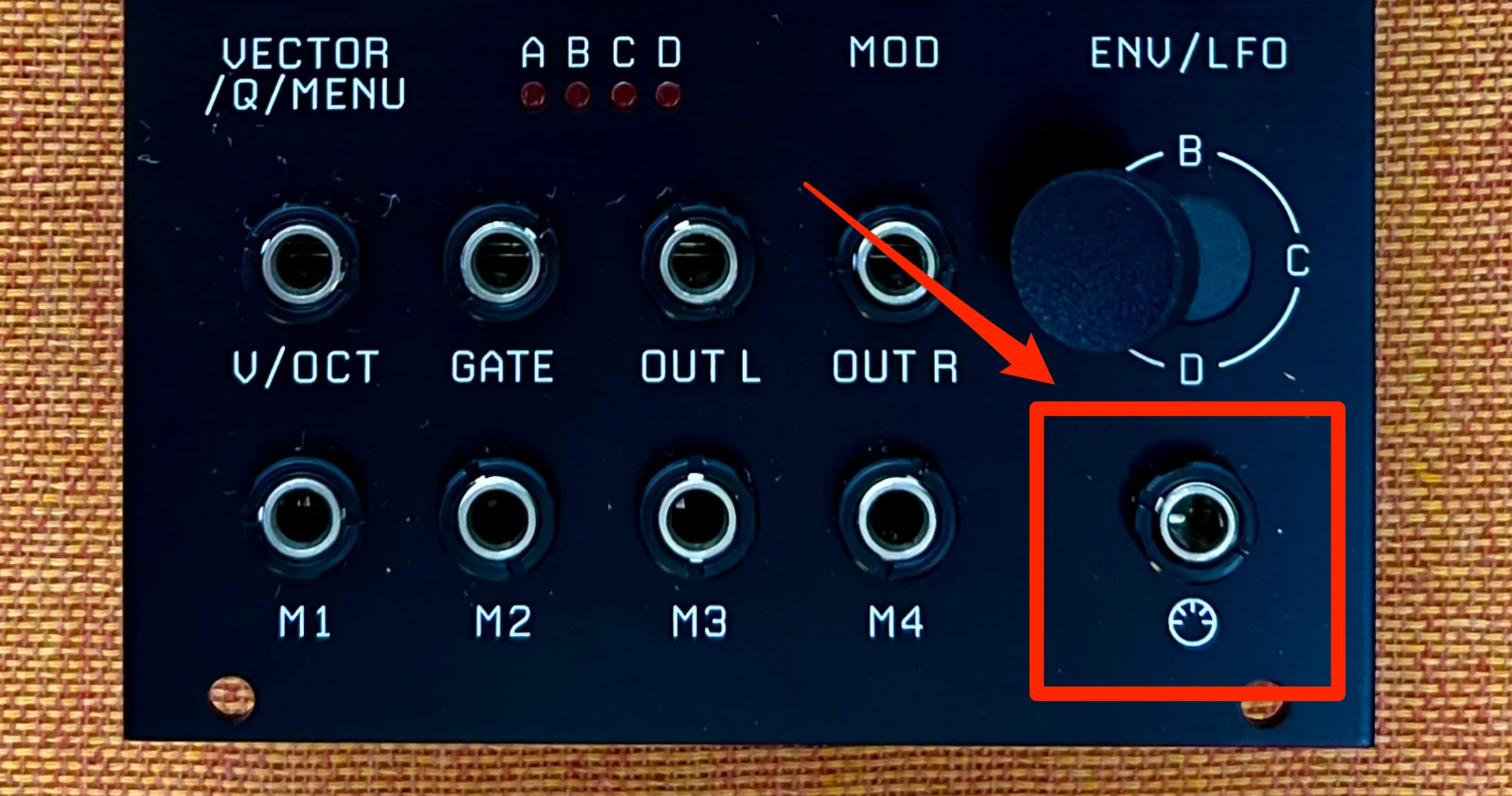
It pairs perfectly with standalone MIDI sequencers like the OXI ONE that we carry at Takazudo Modular.
So the module supports both analog control via M1–M4 CV input and MIDI control—the best of both worlds.
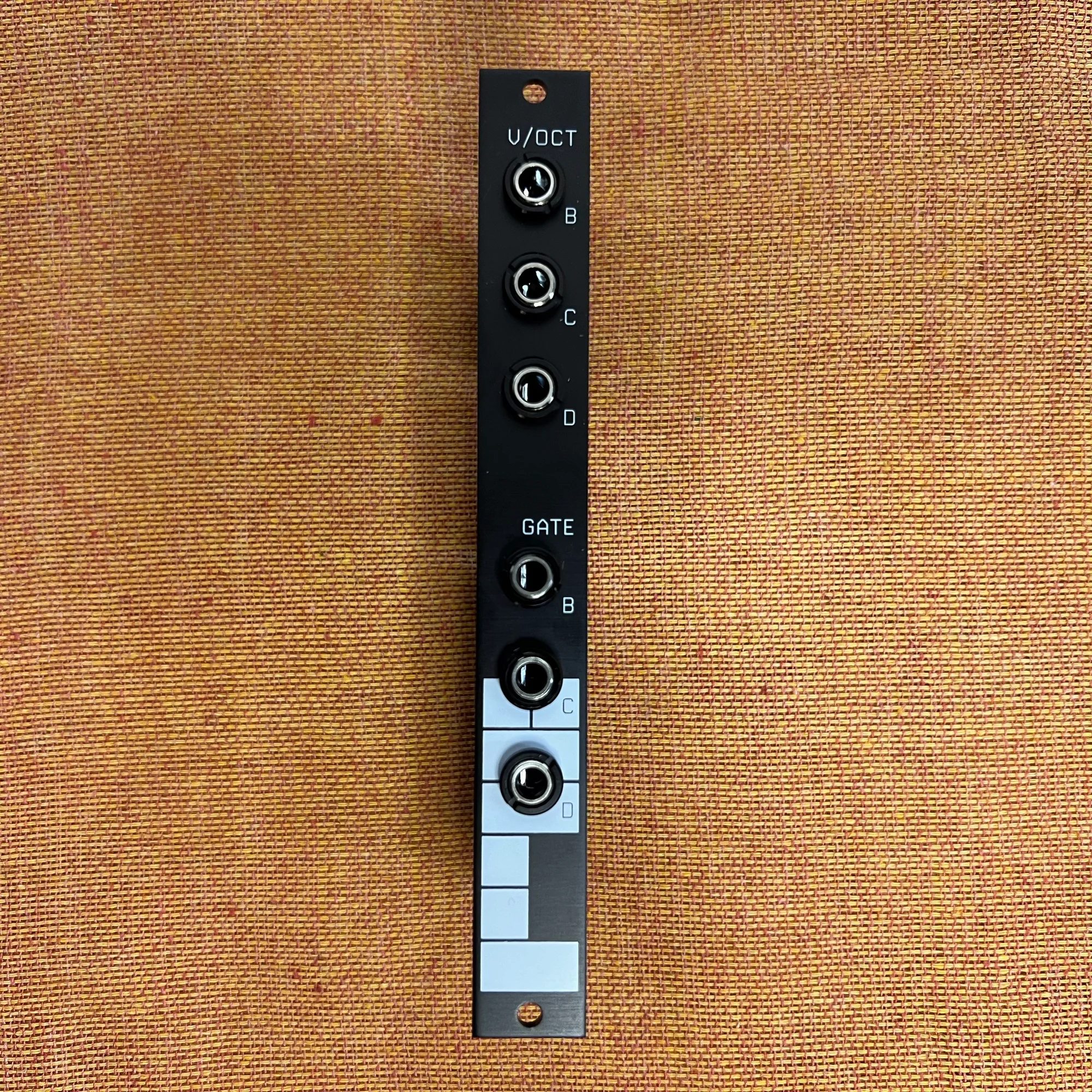
Additionally, the Vector Wave Expander adds three more 1V/Oct and three more gate inputs to Vector Wave. With the expander, independent pitch control of four oscillators in multi-timbral mode becomes possible without MIDI. Combined with quantizers like the ones we carry:
…you can further enhance sequencing flexibility.
When to Use Vector Wave
There are many more detailed features, but the above covers the broad overview of Vector Wave’s functionality. Despite its rich digital module configuration, the Slot system allows it to integrate seamlessly with other analog modules—a flexibility that’s very appealing.
Many digital oscillator modules with numerous adjustable parameters are typically designed to be controlled via pre-assigned MIDI CCs. For instance, if 40 parameters are controllable, you’d use MIDI CCs 1 through 40.
While that allows flexible control, combining such a module with other modular synths often requires converting CV to MIDI CC, setting up detailed MIDI controller configurations on a PC or iPad, and building tightly integrated systems. And such modules can feel unintuitive, leading many to sell them before using them deeply…
Vector Wave takes a different approach: if you want to adjust a parameter, you assign a CC as the modulation source via a Slot. According to RYK Modular’s website, this was intentionally designed for simplicity. The fact that it fully supports MIDI while being designed to integrate naturally into modular systems is a significant appeal of this module.
Additionally, the joystick-based 4-bank switching is a feature worth exploring deeply. Using the joystick for smooth tonal transitions is fun, but simply having four preset tones that are easily switchable is already quite useful.
For live performance scenarios, you could prepare your desired presets across four banks and flexibly mix and switch between them during performance. This promises far more flexible performance experiences than simply switching between many presets.
One thing to be aware of is that this module uses 16 oscillators plus built-in LFOs, Envelopes, and more—a very rich configuration that makes it a complex module requiring effort to understand. FM Synthesis itself is somewhat challenging to control precisely. As the manual suggests, starting with subtle, gentle modulations and gradually becoming proficient is the recommended approach.
Reference Videos
Below is the official RYK Modular Vector Wave introduction video. It comprehensively covers the diverse features.
Below is a session I recorded playing the Vector Wave. Only the Vector Wave is sounding, with the expander providing 1V/Oct and Gate control.
Other Notes
- Built in January 2024; the installed firmware version is V1.25.
- The CLK/MIDI jack accepts both Type A and Type B MIDI. A MIDI switch on the back toggles between them.
Specifications
- Vector Wave
- Width: 17HP
- Depth: 25mm
- Power consumption: 60mA +12V / 15mA -12V / 0mA 5V
- Expander
- Width: 3HP
- Depth: 25mm
- Power consumption: 1mA +12V / 1mA -12V / 0mA 5V
Included Items
- Vector Wave
- Power ribbon cable
- Screws
- Manual (English)
- Expander
- Connection ribbon cable
- Screws
Manual
The manual is available on the official website below.
Vector Wave Expander Connection Guide
Here’s a detailed guide for connecting the Vector Wave Expander. A video is the quickest way to understand, so please see below.
This module requires an initial calibration. The procedure is as follows:
- Connect the 12-pin EXPANDER header on the back of Vector Wave to the Vector Wave Expander using the included ribbon cable (see photo below)
- Set the rear switch to 0V (for initial 0V calibration)
- On the Vector Wave, hold the leftmost grey button and the rightmost
ENV/LFObutton while powering on - Confirm
EXP CALis displayed, indicating calibration mode has started - Press the bottom-right knob once to begin calibration
0Vis displayed and the display changes several times. Do nothing during this step.- When
5Vis displayed, immediately switch the Expander’s rear switch to5V. You only have a few seconds for this switch. (If you miss it, power off and restart from the beginning) - The display changes several times, and when
DONEappears, calibration is complete - Set the rear switch back to
0Vand power off
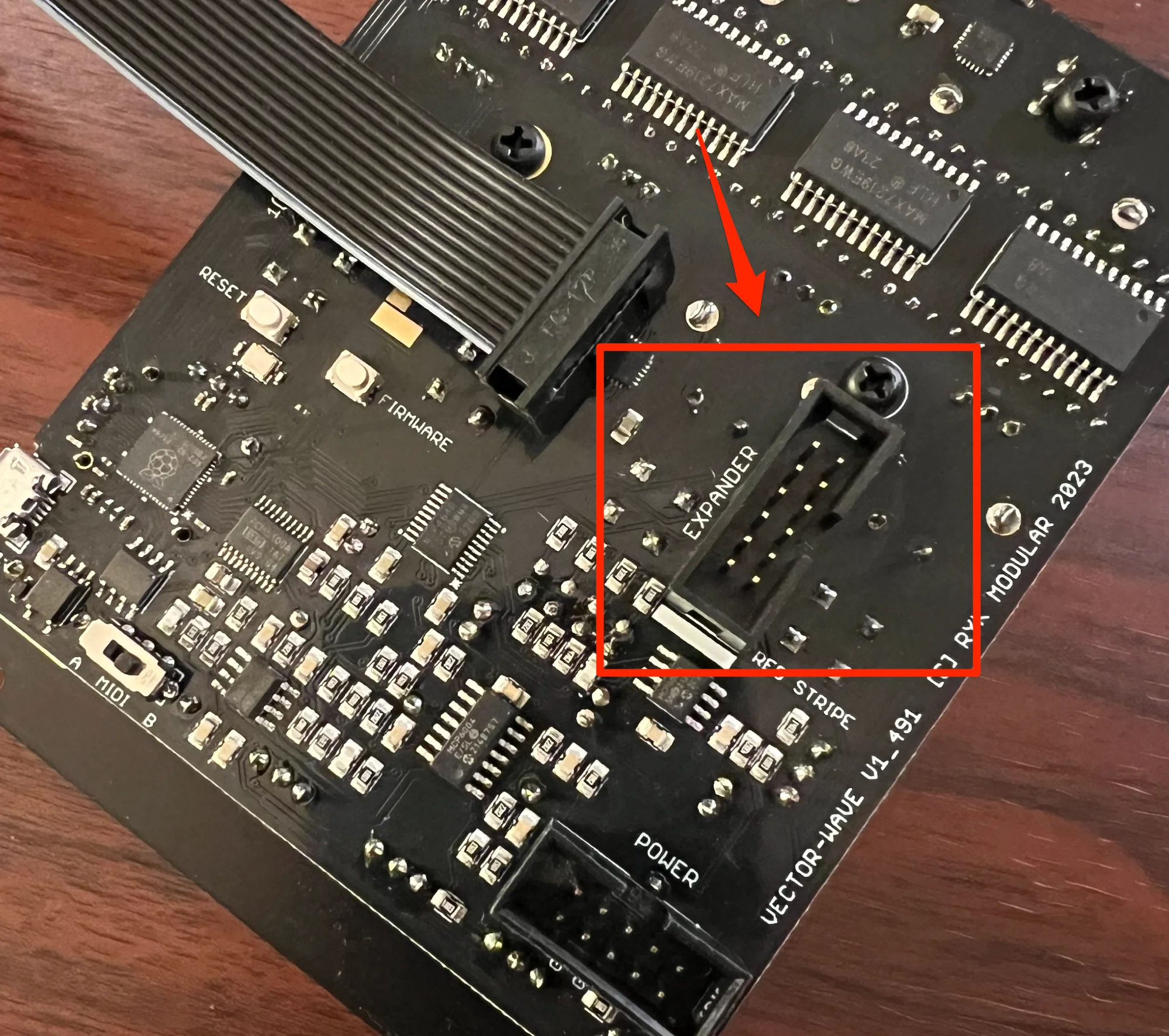
Note that since you’ll be handling the module’s back while powered on, be careful of static electricity, and ensure no metal objects like screws or patch cable tips touch the components on the module’s back. In the worst case, this could short-circuit and damage the module.
Calibration only needs to be performed once.
When MULT mode is selected on Vector Wave, the 2nd through 4th oscillators’ pitch and gate can be controlled via the Expander’s input jacks.
RYK Modularについて
RYK Modularはイギリスを拠点として活動するモジュラーシンセメーカーです。
RYK Modularの作るモジュールはユニークでありながら実用的。現在最も注目されているM185は、古典的なシーケンサーをモジュラーで使いやすい形に再構築したものです。また、VectorWaveというFM音源のオシレーターモジュールも秀逸です。
オマケ: 電氣美術研究會モジュラー小物セット付き

モジュラーシンセをもっと多くの方に触って欲しいという願いの元、電氣美術研究會さまにご協力頂き、モジュラー小物セットを本商品にバンドルさせて販売させていただいております。
パッチケーブルや電源ケーブル、ドレスナットのサンプルセット、モノラルスプリッターなど、内容は時期に応じて変化します。商品に同梱しますので是非お試し下さい!
That concludes our introduction of Vector Wave.
Making full use of digital advantages while also enabling flexible CV control—and looking cool too. The interface operability is well thought out, making it an oscillator especially recommended for those who want to explore FM synthesis further.
We hope you find this helpful.