WebKit Form Autocomplete Pill in Tauri Apps
The floating "recent value" pill that appears below text inputs is WKWebView form autofill, not a Tauri feature. When to keep it and when to disable it.
The symptom
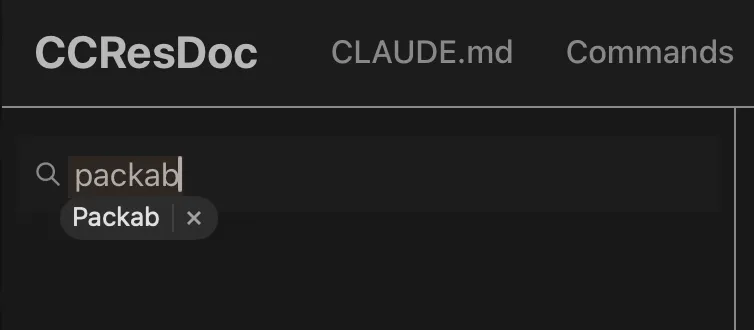
You add a search input to a Tauri app on macOS. As soon as the user types one or two characters, a small floating pill appears below the input — a previously typed value with an × to dismiss it. Clicking the pill fills the input with that value.
It looks out of place. The app already shows its own search-results dropdown right below the input, and the pill overlaps with it. Worse, the suggested value is whatever the user happened to type last time, which has nothing to do with the actual content the user is searching against.
This is not a Tauri bug. It is WebKit’s built-in form autofill suggestion, the same UI Safari shows. Tauri on macOS uses WKWebView, so any web app inside it gets the same behavior by default.
📝 Note
Tauri apps are web apps inside WKWebView. Anything Safari does to a <form> or <input> — autofill, autocorrect, spellcheck, “AutoFill Other Forms” history — happens inside Tauri too, unless the page opts out.
ℹ️ Info
Platform scope. This article is about macOS Tauri apps, where the embedded engine is WKWebView. On Windows the engine is WebView2 (Chromium) and on Linux it is WebKitGTK; both have their own autofill mechanisms with different behavior, defaults, and disable knobs. The HTML attributes covered here (autocomplete, autocorrect, autocapitalize, spellcheck) are standard and broadly portable, but the WebKit-specific quirks below — particularly the way autocomplete="off" is treated as a soft hint — apply to the macOS / iOS WKWebView path.
What the pill actually is
The pill is WebKit’s per-input value history: previously entered values for the same field, scoped to the origin (and, in WKWebView, the webview’s data store). It is not:
- macOS input method (IME) suggestions
- Inline autocorrect / text replacement
- HTML5
<datalist> - A Tauri-injected overlay
WebKit decides which inputs participate based on heuristics over name, id, type, and surrounding markup. Credential fields (login, password) are a separate code path tied to Keychain. For everything else — search boxes, comments, freeform text — the pill comes from WebKit’s local value cache for that origin and field.
In a freshly built Tauri app the cache starts empty, so users do not see the pill on first launch. After a few sessions of typing into the same input, WebKit has enough history to start suggesting.
When to keep autofill on
For most web apps, keep it on. Browsers expose autofill because users want it: an email field that remembers their address, a “Full Name” field that fills from contacts, a shipping address that does not need to be retyped on every site. Disabling autofill on those fields makes the app feel hostile.
Cases where the default is the right call:
- Login forms (handled by Keychain, separate from the pill anyway)
- Email, name, address, phone fields on profile / checkout pages
- Anything mapped to a WHATWG autocomplete token like
email,street-address,cc-number
When to turn it off
Tauri apps tilt heavily toward this side, because they are usually closer to “desktop tool” than “web form”. The pill becomes noise when the input is not really a form field in the traditional sense:
- App-internal search boxes — site search, command palette, file finder, log filter. The user wants to search the app’s data, not autocomplete from their own typing history.
- Custom autocomplete / combobox widgets — the app already renders its own dropdown of suggestions. WebKit’s pill stacks on top and clashes with it.
- One-off sensitive fields — one-time passwords, CVV, API tokens shown once. These should never be remembered.
The CCResDoc screenshot at the top of this article is a textbook example: a search input with the app’s own “Packab” result already rendered below it, plus WebKit’s pill suggesting the same string. Two competing UIs for the same job.
How to disable it
There is no Tauri-level setting for this. The official tauri.conf.json and WKWebViewConfiguration do not expose a “disable form autofill” toggle. Suppression has to happen per input, in the HTML.
The knobs, in order of reliability:
1. Try autocomplete="off" first
<input type="search" autocomplete="off" />In React: autoComplete="off" (camelCase).
This is the standard and works in most browsers. On WebKit it is a soft hint — WebKit reserves the right to ignore it for fields it classifies as login / email / address (WebKit bug 71395). For a generic search box it usually wins; for anything that smells like a credential field it will not.
2. Use an unpredictable name, or drop name entirely
WebKit keys the value history off name (and to a lesser extent id). If name does not match any field WebKit has stored values for, no pill appears.
<!-- Reliable: no name -->
<input type="search" autocomplete="off" />

<!-- Reliable: unpredictable name -->
<input type="search" name="search-a8f3c9" autocomplete="off" />

<!-- Risky: a semantic name like "search" or "q" can be matched against
     stored history from any prior input with that name on the same origin -->
<input type="search" name="q" autocomplete="off" />
Dropping name works for inputs that are not part of a real <form> submission, which covers most app-internal search and filter boxes anyway.
3. type="search" vs type="text" does not matter
Both trigger the pill. type="search" adds the small UI clear button and rounded styling on Safari, but does not change autofill behavior. Do not change type hoping to suppress autofill — it will not.
4. Do not confuse autofill with the other text helpers
These attributes target different WebKit features and do not affect the autofill pill:
<input
  type="search"
  autocomplete="off"
  autocorrect="off"
  autocapitalize="off"
  spellcheck="false"
/>| Attribute | Affects |
|---|---|
autocomplete="off" | The autofill pill (this article) |
autocorrect="off" | macOS inline autocorrect (red underline + replace) |
autocapitalize="off" | First-letter / sentence capitalization |
spellcheck="false" | The wavy red spellcheck underline |
Set them together for app-internal search if you want the cleanest input UX, but understand each addresses a different problem. Adding spellcheck="false" will not silence the autofill pill, and adding autocomplete="off" will not stop spellcheck underlines.
A working pattern for app-internal search
Putting it together, this is the input markup CCResDoc-style search boxes typically want:
<input
  type="search"
  // No name -- not part of a form submission
  placeholder="Search..."
  autoComplete="off"
  autoCorrect="off"
  autoCapitalize="off"
  spellCheck={false}
  value={query}
  onChange={(e) => setQuery(e.target.value)}
/>
If the input must have a name (because some library or form library requires it), use a randomized or domain-specific name unlikely to collide with real form fields:
<input
  type="search"
  name="ccresdoc-search-query"   // not "search" / "q" / "query"
  autoComplete="off"
  // ...
/>
💡 Tip
If the pill still appears after autocomplete="off", it is almost always because WebKit decided the field is “interesting” based on its name or surrounding form. Renaming the field or dropping name clears it.
Key takeaways
- The pill is WKWebView form autofill, not a Tauri overlay. Same behavior as Safari — because it is Safari’s engine.
- Keep autofill on for real form fields (email, address, login). Disabling it there hurts users.
- Turn it off for app-internal search and custom comboboxes where it duplicates or clashes with the app’s own suggestions.
autocomplete="off"is the first knob, but not always honored. Pair it with a non-semanticname(or noname) for reliable suppression in WebKit.- There is no global Tauri setting. Suppress per input in HTML.
autocorrect/autocapitalize/spellcheckare different features. Set them when relevant, but do not expect them to silence the autofill pill on their own.